What is an ant? A six-legged insect that annoys you like no tomorrow during a family outing? Well, yes, but in this case an ant is a type of test we software programmers use to run a series of commands in an attempt make sure our program is working correctly.
Prior to learning how to use use ant to do debugging, I used "make" to create similar things, but could only be used in a Linux environment. What was nice about ant, is that it is able to be used over multiple platforms, specifically when it comes to the forward slash in Mac/Linux and the backslash in Windows. This was something I really liked as both platforms are used in the professional environment.
The biggest thing I think I learned from working on these ant kata was how much time the script could potentially save you when building large systems that would normally require you to be constantly typing things in to the terminal. It took me quite some time to get started as I didn't know much XML and the syntax is totally different from any other programming language; it is more similar to HTML actually. However, once I got the hang of things, figuring things out was pretty simple. Apache even has a manual online that lists all the attributes of the tasks and an explanation of each. This was a very significant help in completing these kata.
Link to the manual: http://ant.apache.org/manual/Tasks/
Thursday, September 29, 2011

Tuesday, September 20, 2011
Robot Kata
First of all, what exactly is a "kata"? In Japanese, kata is translated as form, but can also mean a set of choreographed movements that aim to perfect certain movements. Now what exactly is a "code kata"? Well it is exactly what it sounds like. It's a "kata" that uses code. We design various kata in order to perfect certain things.
When a lot of people think of programming, they see it as either designing an application, or programming something to do something; usually robots. So let's do that. Let's program robots; and not just any robot, it's a robot that can move, fight, and even scan. All this is done virtually of course. We're talking about a competition called "Robocode".
There were 13 kata I attempted to perfect, however I was only able to finish 12 of them.
When starting the follow kata, A few hours of reading up on the API on how the robot scans took up the bulk of the time, along with experimenting on how they work. Eventually I was able to figure out the first 2 follow kata, but the Follow03 one doesn't quite do exactly what it is supposed to, but it generally does.
The Boom set of kata was probably the most fun because well, it's how you win. Learning how the gun and radar work together allowed me to start thinking about how the I will be creating a targeting system for my competition robot. Like I mentioned earlier, I only finished 12 of the 13 kata, and the one I didn't finish was the last one. I had troubles getting the gun to move at the same time with the enemy robot and therefore was unable to figure it out. However, I plan to try to get it to work as it is a vital part of the weapon system I am considering on implementing
Overall, the kata took some thinking, but wasn't impossibly hard. As long as one finished the previous kata, the next one often times built on it. It taught me the abilities each robot was able to do and how it is going to help with my competitive robot in the future.
When a lot of people think of programming, they see it as either designing an application, or programming something to do something; usually robots. So let's do that. Let's program robots; and not just any robot, it's a robot that can move, fight, and even scan. All this is done virtually of course. We're talking about a competition called "Robocode".
There were 13 kata I attempted to perfect, however I was only able to finish 12 of them.
- Position01: The minimal robot. Does absolutely nothing at all.
- Position02: Move forward a total of 100 pixels per turn. When you hit a wall, reverse direction.
- Position03: Each turn, move forward a total of N pixels per turn, then turn right. N is initialized to 15, and increases by 15 per turn.
- Position04: Move to the center of the playing field, spin around in a circle, and stop.
- Position05: Move to the upper right corner. Then move to the lower left corner. Then move to the upper left corner. Then move to the lower right corner.
- Position06: Move to the center, then move in a circle with a radius of approximately 100 pixels, ending up where you started.
- Follow01: Pick one enemy and follow them.
- Follow02: Pick one enemy and follow them, but stop if your robot gets within 50 pixels of them.
- Follow03: Each turn, Find the closest enemy, and move in the opposite direction by 100 pixels, then stop.
- Boom01: Sit still. Rotate gun. When it is pointing at an enemy, fire.
- Boom02: Sit still. Pick one enemy. Only fire your gun when it is pointing at the chosen enemy.
- Boom03: Sit still. Rotate gun. When it is pointing at an enemy, use bullet power proportional to the distance of the enemy from you. The farther away the enemy, the less power your bullet should use (since far targets increase the odds that the bullet will miss).
- Boom04: Sit still. Pick one enemy and attempt to track it with your gun. In other words, try to have your gun always pointing at that enemy. Don't fire (you don't want to kill it).
When starting the follow kata, A few hours of reading up on the API on how the robot scans took up the bulk of the time, along with experimenting on how they work. Eventually I was able to figure out the first 2 follow kata, but the Follow03 one doesn't quite do exactly what it is supposed to, but it generally does.
The Boom set of kata was probably the most fun because well, it's how you win. Learning how the gun and radar work together allowed me to start thinking about how the I will be creating a targeting system for my competition robot. Like I mentioned earlier, I only finished 12 of the 13 kata, and the one I didn't finish was the last one. I had troubles getting the gun to move at the same time with the enemy robot and therefore was unable to figure it out. However, I plan to try to get it to work as it is a vital part of the weapon system I am considering on implementing
Overall, the kata took some thinking, but wasn't impossibly hard. As long as one finished the previous kata, the next one often times built on it. It taught me the abilities each robot was able to do and how it is going to help with my competitive robot in the future.
Tuesday, August 30, 2011
FizzBuzz Solution
Shown above are two solutions to the FizzBuzz problem. The first one is a generic solution that did exactly what it needed to do and took me approximately 4 minutes to do. Below is my final solution where I modified the code to make it much more organized and reduce the margin for error if I were to expand on this code. The modification was fairly simple since all the required code already existed and only took me an extra two minutes or so to do.
I have been using Eclipse for a few years now so I am fairly comfortable using it. I did not run into any problems with Eclipse or Java itself so the entire process went very smoothly. From writing this solution, I can expect this class to help me in my software development skills by improving my programming practices as shown by the code modification that we had discussed during class.
Sunday, August 28, 2011
Does "Loop Maker" Satisfy The Three Prime Directives?
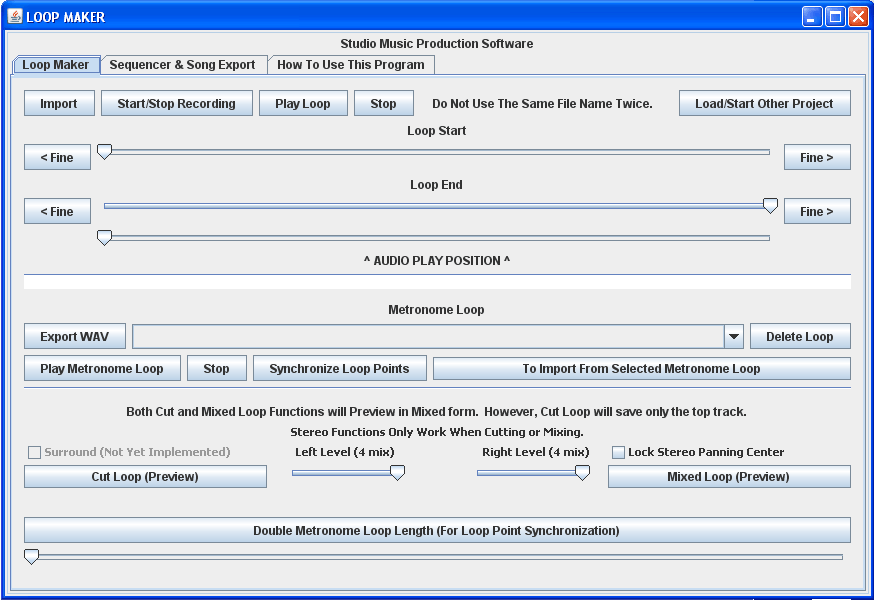
Music has been around for centuries. Today, the most popular songs are those with the best beats and a catchy rhythm. Loop Maker is an application that allows you to create the backbone of any song, the beat. The application lets you import WAV files and create your own beats for writing your own music. Loop Maker takes almost no configuration to install and get up and running and because it is written in Java, it can be used over multiple platforms.


Prime Directive 1: The system successfully accomplishes a useful task.
Loop Maker accomplishes exactly what it was designed to do. It allows the user to create custom beats from WAV files by looping pieces of the sound file or even the whole thing. The application also allows users to combine the sound files so that the final result is not a few minutes of repetition. The only big flaw I ran into while using the application was how specific the file type had to be. The application requests a 44100Hz-16bit-stereo WAV file. While it does not seem like a big problem, it was quickly realized that not all WAV files are set up in this manner and the user may not be able to use the file they want to.
Prime Directive 2: An external user can successfully install and use the system.
Loop Maker comes as an executable file that is ready to run. On Windows, it was as simple as running the executable files, which runs a JAR file. All the user had to do was specify the directory to save the files to. The instructions to use the application were built into the user interface, but were slightly vague and took a few minutes to figure out. However, once figured out, the application is fairly simple to use. I used a few WAV files from my own collection and created my own beat fairly easily. The user interface was very easy to navigate and all the buttons and input fields were clearly labeled.
Prime Directive 3: An external developer can successfully understand and enhance the system.
The source code has a fair amount of comments, but at times, some were far too general and required a bit of time deciphering code to figure out the functionality. Another downfall is that there was no developer documentation that I could find. Another developer would simply have to simply attack it with their own knowledge.
Source Code
Download Application

Subscribe to:
Posts (Atom)